バーの塗りつぶしスタイル
各バーは個別にスタイル設定できます。
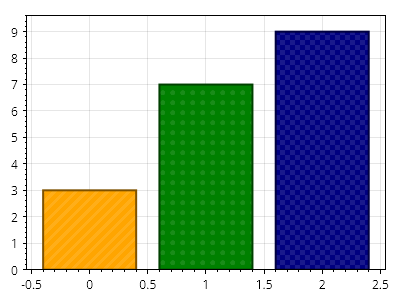
ScottPlot.Plot myPlot = new();

// サンプルデータでバーを追加する
double[] values = { 3, 7, 9 };
var barPlot = myPlot.Add.Bars(values);

// バーは追加後にスタイル設定できる
barPlot.Bars[0].FillColor = Colors.Orange;
barPlot.Bars[1].FillColor = Colors.Green;
barPlot.Bars[2].FillColor = Colors.Navy;

barPlot.Bars[0].FillHatch = new ScottPlot.Hatches.Striped();
barPlot.Bars[1].FillHatch = new ScottPlot.Hatches.Dots();
barPlot.Bars[2].FillHatch = new ScottPlot.Hatches.Checker();

foreach (var bar in barPlot.Bars)
{
    bar.LineWidth = 2;
    bar.LineColor = bar.FillColor.Darken(0.5);
    bar.FillHatchColor = bar.FillColor.Lighten(0.1);
}

// バーの下に余白がないようにプロットを自動スケーリングする
myPlot.Axes.Margins(bottom: 0);

myPlot.SavePng("demo.png", 400, 300);
このレシピは、バー プロットカテゴリに含まれる多数のレシピの 1 つです