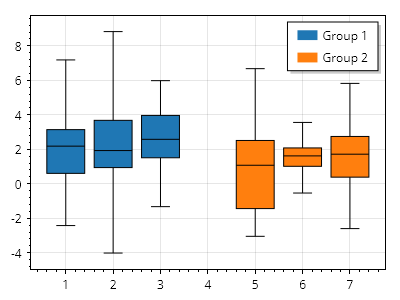
箱ひげ図のグループ
プロットに追加された箱の各コレクションは同じスタイルになり、凡例では単一の項目として表示されます。定義済みの X 位置を持つ複数の棒系列プロットを追加すると、グループ化されたデータのように見せることができます。
ScottPlot.Plot myPlot = new();

List<ScottPlot.Box> boxes1 = new() {
    Generate.RandomBox(1),
    Generate.RandomBox(2),
    Generate.RandomBox(3),
};

List<ScottPlot.Box> boxes2 = new() {
    Generate.RandomBox(5),
    Generate.RandomBox(6),
    Generate.RandomBox(7),
};

var bp1 = myPlot.Add.Boxes(boxes1);
bp1.LegendText = "グループ 1";

var bp2 = myPlot.Add.Boxes(boxes2);
bp2.LegendText = "グループ 2";

myPlot.ShowLegend(Alignment.UpperRight);

myPlot.SavePng("demo.png", 400, 300);
このレシピは、箱ひげ図カテゴリにある多くのレシピの 1 つです