カスタム目盛りフォーマッター
ユーザーは、目盛り位置から目盛りラベルを作成するために使用されるロジックをカスタマイズできます。古いバージョンの ScottPlot では、ManualTickPositions メソッドを使用してこれを実現していました。
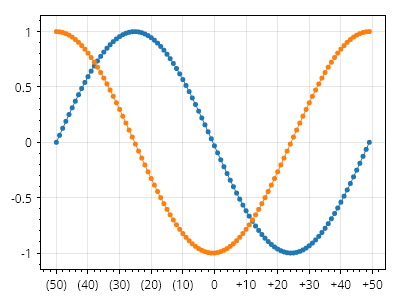
ScottPlot.Plot myPlot = new();

double[] xs = Generate.Consecutive(100, 1, -50);
myPlot.Add.Scatter(xs, Generate.Sin(100));
myPlot.Add.Scatter(xs, Generate.Cos(100));

// 文字列フォーマットロジックを含む静的関数を作成する
static string CustomFormatter(double position)
{
    if (position == 0)
        return "0";
    else if (position > 0)
        return $"+{position}";
    else
        return $"({-position})";
}

// カスタムラベルフォーマッターを使用するカスタム目盛りジェネレーターを作成する
ScottPlot.TickGenerators.NumericAutomatic myTickGenerator = new()
{
    LabelFormatter = CustomFormatter
};

// 軸にカスタム目盛りジェネレーターを使用するよう指示する
myPlot.Axes.Bottom.TickGenerator = myTickGenerator;

myPlot.SavePng("demo.png", 400, 300);
このレシピは、目盛りのカスタマイズカテゴリにある多くのレシピの 1 つです