長いラベルを持つ回転目盛り
軸のサイズを大きくすることで、回転した目盛りラベルや長い目盛りラベルに対応できます。
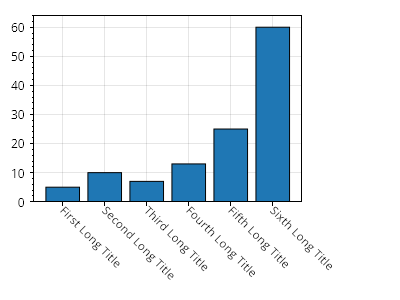
ScottPlot.Plot myPlot = new();

// 棒グラフを作成する
double[] values = { 5, 10, 7, 13, 25, 60 };
myPlot.Add.Bars(values);
myPlot.Axes.Margins(bottom: 0);

// 各棒に目盛りを作成する
Tick[] ticks =
{
    new(0, "1つ目の長いタイトル"),
    new(1, "2つ目の長いタイトル"),
    new(2, "3つ目の長いタイトル"),
    new(3, "4つ目の長いタイトル"),
    new(4, "5つ目の長いタイトル"),
    new(5, "6つ目の長いタイトル")
};
myPlot.Axes.Bottom.TickGenerator = new ScottPlot.TickGenerators.NumericManual(ticks);
myPlot.Axes.Bottom.TickLabelStyle.Rotation = 45;
myPlot.Axes.Bottom.TickLabelStyle.Alignment = Alignment.MiddleLeft;

// 最大の目盛りラベルの幅を判定する
float largestLabelWidth = 0;
using Paint paint = Paint.NewDisposablePaint();
foreach (Tick tick in ticks)
{
    PixelSize size = myPlot.Axes.Bottom.TickLabelStyle.Measure(tick.Label, paint).Size;
    largestLabelWidth = Math.Max(largestLabelWidth, size.Width);
}

// 軸パネルが最大ラベルより小さくならないようにする
myPlot.Axes.Bottom.MinimumSize = largestLabelWidth;
myPlot.Axes.Right.MinimumSize = largestLabelWidth;

myPlot.SavePng("demo.png", 400, 300);
このレシピは、目盛りのカスタマイズカテゴリに含まれる多数のレシピのうちの1つです