ErrorBar 値
エラーサイズはすべての次元に対して設定できます。
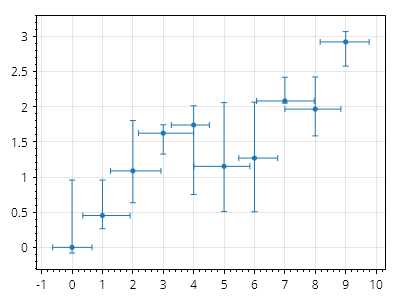
ScottPlot.Plot myPlot = new();

int points = 10;

double[] xs = Generate.Consecutive(points);
double[] ys = Generate.RandomWalk(points);
var scatter = myPlot.Add.Scatter(xs, ys);
scatter.LineStyle.Width = 0;

ScottPlot.Plottables.ErrorBar eb = new(
    xs: xs,
    ys: ys,
    xErrorsNegative: Generate.RandomSample(points, .5),
    xErrorsPositive: Generate.RandomSample(points, .5),
    yErrorsNegative: Generate.RandomSample(points),
    yErrorsPositive: Generate.RandomSample(points));

eb.Color = scatter.Color;

myPlot.Add.Plottable(eb);

myPlot.SavePng("demo.png", 400, 300);
このレシピは、エラーバー カテゴリにある多数のレシピの 1 つです