アルファマップ
アルファマップ(バイト値の2次元配列)を使用すると、ヒートマップの各セルにカスタムの透明度を適用できます。
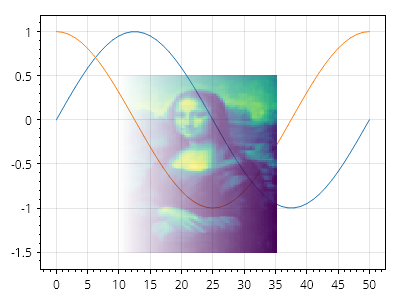
ScottPlot.Plot myPlot = new();

// データ値はヒートマップのカラーマップに基づいて色に変換されます
double[,] data = SampleData.MonaLisa();

// アルファマップは各セルの透明度を制御します
byte[,] alphaMap = new byte[data.GetLength(0), data.GetLength(1)];

// アルファマップに 0(透明)から 255(不透明)までの値を設定します
for (int y = 0; y < alphaMap.GetLength(0); y++)
{
    for (int x = 0; x < alphaMap.GetLength(1); x++)
    {
        double fractionAcross = (double)x / alphaMap.GetLength(1);
        alphaMap[y, x] = (byte)(fractionAcross * 255);
    }
}

// 折れ線グラフを作成します
myPlot.Add.Signal(Generate.Sin());
myPlot.Add.Signal(Generate.Cos());

// 折れ線グラフの上にヒートマップをプロットします
var hm = myPlot.Add.Heatmap(data);
hm.Position = new(10, 35, -1.5, .5);
hm.AlphaMap = alphaMap;

myPlot.SavePng("demo.png", 400, 300);
このレシピは、ヒートマップカテゴリに含まれる多数のレシピの1つです