インタラクティブな水平線分
水平線分は、左端と右端をドラッグすることで水平方向に拡張したり、中心線をドラッグすることで垂直方向にスライドしたりできます。
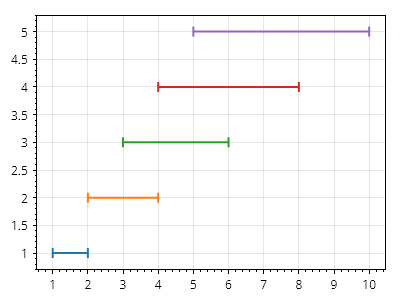
ScottPlot.Plot myPlot = new();

for (int i = 1; i <= 5; i++)
{
    double y = i;
    double x1 = i;
    double x2 = i * 2;
    myPlot.Add.InteractiveHorizontalLineSegment(x1, x2, y);
}

myPlot.SavePng("demo.png", 400, 300);
このレシピは、インタラクティブカテゴリにある多数のレシピの 1 つです