自動色による凡例マーカー形状のオーバーライド
凡例の形状オーバーライドを使用して、すべての凡例項目が指定されたマーカー形状で表示されるように強制します。この例では、色は自動的に決定されます。
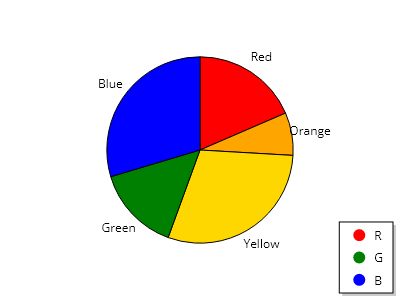
ScottPlot.Plot myPlot = new();

List<PieSlice> slices =
[
    new PieSlice() { Value = 5, FillColor = Colors.Red, Label = "赤", LegendText = "R" },
    new PieSlice() { Value = 2, FillColor = Colors.Orange, Label = "オレンジ" },
    new PieSlice() { Value = 8, FillColor = Colors.Gold, Label = "黄" },
    new PieSlice() { Value = 4, FillColor = Colors.Green, Label = "緑", LegendText = "G" },
    new PieSlice() { Value = 8, FillColor = Colors.Blue, Label = "青", LegendText = "B" },
];

myPlot.Legend.MarkerShapeOverride = MarkerShape.FilledCircle;

var pie = myPlot.Add.Pie(slices);

myPlot.Axes.Frameless();
myPlot.HideGrid();
myPlot.ShowLegend();

myPlot.SavePng("demo.png", 400, 300);
このレシピは、凡例カテゴリに含まれる多数のレシピの 1 つです