マーカー形状
標準のマーカー形状が用意されていますが、上級ユーザーは独自の形状を作成することもできます。
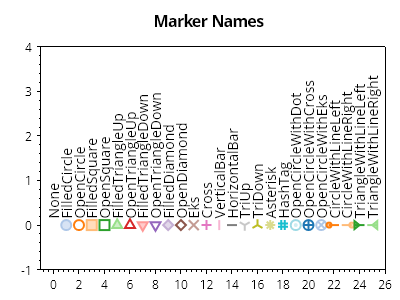
ScottPlot.Plot myPlot = new();

MarkerShape[] markerShapes = Enum.GetValues<MarkerShape>().ToArray();
ScottPlot.Palettes.Category20 palette = new();

for (int i = 0; i < markerShapes.Length; i++)
{
    var mp = myPlot.Add.Marker(x: i, y: 0);
    mp.MarkerStyle.Shape = markerShapes[i];
    mp.MarkerStyle.Size = 10;

    // 塗りつぶし形状で作成されたマーカーはカスタマイズできます
    mp.MarkerStyle.FillColor = palette.GetColor(i).WithAlpha(.5);

    // 塗りつぶし形状で作成されたマーカーには、任意でアウトラインを付けられます
    mp.MarkerStyle.OutlineColor = palette.GetColor(i);
    mp.MarkerStyle.OutlineWidth = 2;

    // 線で作成されたマーカーはカスタマイズできます
    mp.MarkerStyle.LineWidth = 2f;
    mp.MarkerStyle.LineColor = palette.GetColor(i);

    var txt = myPlot.Add.Text(markerShapes[i].ToString(), i, 0.15);
    txt.LabelRotation = -90;
    txt.LabelAlignment = Alignment.MiddleLeft;
    txt.LabelFontColor = Colors.Black;
}

myPlot.Title("マーカー名");
myPlot.Axes.SetLimits(-1, markerShapes.Length, -1, 4);
myPlot.HideGrid();

myPlot.SavePng("demo.png", 400, 300);
このレシピは、マーカーカテゴリにある多数のレシピのうちの1つです