カラー補間
色を混ぜ合わせて、さまざまな色を作成できます。この方法では、線形 RGB 補間を使用します。
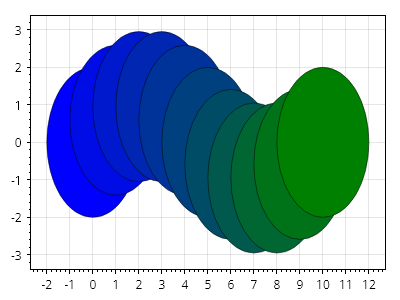
ScottPlot.Plot myPlot = new();

for (int i = 0; i <= 10; i++)
{
    double fraction = (double)i / 10;
    double x = i;
    double y = Math.Sin(Math.PI *2* fraction);
    var circle = myPlot.Add.Circle(x, y, 2);
    circle.FillColor = Colors.Blue.MixedWith(Colors.Green, fraction);
    circle.LineColor = Colors.Black.WithAlpha(.5);
}

myPlot.SavePng("demo.png", 400, 300);
このレシピは、その他カテゴリに含まれる多数のレシピの 1 つです