ラベル付きフェーザープロット
テキストラベルは、フェーザープロットの個々の矢印に適用できます。
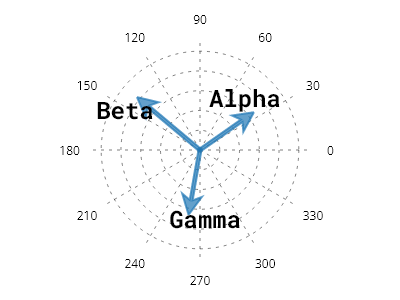
ScottPlot.Plot myPlot = new();

// 極軸をセットアップする
var polarAxis = myPlot.Add.PolarAxis(30);
polarAxis.Circles.ForEach(x => x.LinePattern = LinePattern.Dotted);
polarAxis.Spokes.ForEach(x => x.LinePattern = LinePattern.Dotted);

// フェーザープロットと座標空間内の点を作成する
var phaser = myPlot.Add.Phasor();
phaser.Points.Add(new PolarCoordinates(20, Angle.FromDegrees(35)));
phaser.Points.Add(new PolarCoordinates(25, Angle.FromDegrees(140)));
phaser.Points.Add(new PolarCoordinates(20, Angle.FromDegrees(260)));

// 点のラベルを追加する
phaser.Labels.Add("Alpha");
phaser.Labels.Add("Beta");
phaser.Labels.Add("Gamma");

// ラベルのスタイルを設定する
phaser.LabelStyle.FontSize = 24;
phaser.LabelStyle.ForeColor = Colors.Black;
phaser.LabelStyle.FontName = Fonts.Monospace;
phaser.LabelStyle.Bold = true;

myPlot.SavePng("demo.png", 400, 300);
このレシピは、フェーザープロットカテゴリーに含まれる多数のレシピの1つです