円グラフのスライスラベル
スライスラベルは、円グラフの中心からカスタマイズ可能な距離で、スライスの中央に表示できます。
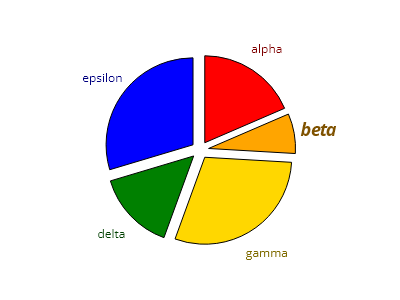
ScottPlot.Plot myPlot = new();

PieSlice slice1 = new() { Value = 5, FillColor = Colors.Red, Label = "アルファ" };
PieSlice slice2 = new() { Value = 2, FillColor = Colors.Orange, Label = "ベータ" };
PieSlice slice3 = new() { Value = 8, FillColor = Colors.Gold, Label = "ガンマ" };
PieSlice slice4 = new() { Value = 4, FillColor = Colors.Green, Label = "デルタ" };
PieSlice slice5 = new() { Value = 8, FillColor = Colors.Blue, Label = "イプシロン" };

List<PieSlice> slices = new() { slice1, slice2, slice3, slice4, slice5 };

// スライスラベルを表示するように円グラフを設定する
var pie = myPlot.Add.Pie(slices);
pie.ExplodeFraction = .1;
pie.SliceLabelDistance = 1.3;

// 各ラベルのテキストの色をスライスに合わせる
slices.ForEach(x => x.LabelFontColor = x.FillColor.Darken(.5));

// 個々のスライスごとにスタイルをカスタマイズできる
slice2.LabelStyle.FontSize = 18;
slice2.LabelStyle.Bold = true;
slice2.LabelStyle.Italic = true;

// 不要なプロットコンポーネントを非表示にする
myPlot.Axes.Frameless();
myPlot.HideGrid();

myPlot.SavePng("demo.png", 400, 300);
このレシピは、円グラフカテゴリにある多数のレシピのうちの1つです