矢印付き極座標軸
矢印は、基点を中心に置き、先端で極座標空間内の点を示すために、極座標系上に配置できます。Phaser プロット型は、この戦略を使用して、同様のスタイルが適用された矢印のコレクションを表示します。
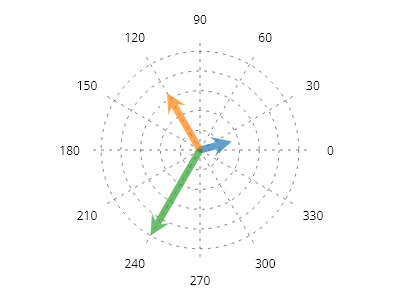
ScottPlot.Plot myPlot = new();

PolarCoordinates[] points = [
    new(10, Angle.FromDegrees(15)),
    new(20, Angle.FromDegrees(120)),
    new(30, Angle.FromDegrees(240)),
];

var polarAxis = myPlot.Add.PolarAxis(radius: 30);
polarAxis.Circles.ForEach(x => x.LinePattern = LinePattern.Dotted);
polarAxis.Spokes.ForEach(x => x.LinePattern = LinePattern.Dotted);

IPalette palette = new ScottPlot.Palettes.Category10();
Coordinates center = polarAxis.GetCoordinates(0, 0);
for (int i = 0; i < points.Length; i++)
{
    Coordinates tip = polarAxis.GetCoordinates(points[i]);
    var arrow = myPlot.Add.Arrow(center, tip);
    arrow.ArrowLineWidth = 0;
    arrow.ArrowFillColor = palette.GetColor(i).WithAlpha(.7);
}

myPlot.SavePng("demo.png", 400, 300);
このレシピは、極座標軸カテゴリにある多数のレシピの 1 つです