極座標軸の線のカスタマイズ
スポークの角度と長さ、および円の位置は手動で定義できます。各スポークと円は個別にスタイル設定することもできます。
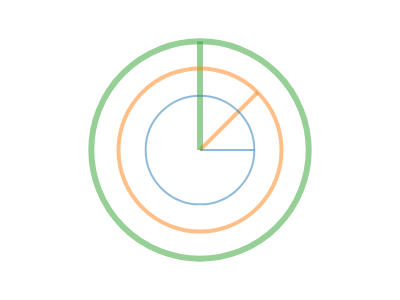
ScottPlot.Plot myPlot = new();

var polarAxis = myPlot.Add.PolarAxis();

// スポークの角度と長さを定義する
polarAxis.Spokes.Clear();
polarAxis.Spokes.Add(new(Angle.FromDegrees(0), 0.5));
polarAxis.Spokes.Add(new(Angle.FromDegrees(45), 0.75));
polarAxis.Spokes.Add(new(Angle.FromDegrees(90), 1.0));

// 円の半径を定義する
polarAxis.Circles.Clear();
polarAxis.Circles.Add(new(0.5));
polarAxis.Circles.Add(new(0.75));
polarAxis.Circles.Add(new(1.0));

// 個別のスポークと円のスタイルを設定する
ScottPlot.Palettes.Category10 pal = new();
for (int i = 0; i < 3; i++)
{
    polarAxis.Circles[i].LineColor = pal.GetColor(i).WithAlpha(.5);
    polarAxis.Spokes[i].LineColor = pal.GetColor(i).WithAlpha(.5);

    polarAxis.Circles[i].LineWidth = 2 + i * 2;
    polarAxis.Spokes[i].LineWidth = 2 + i * 2;
}

myPlot.SavePng("demo.png", 400, 300);
このレシピは、極座標軸カテゴリに含まれる多数のレシピの1つです