Population クイックスタート
Population は、値のコレクションから作成し、必要に応じてスタイルを設定して、プロット上の任意の場所に配置できます。
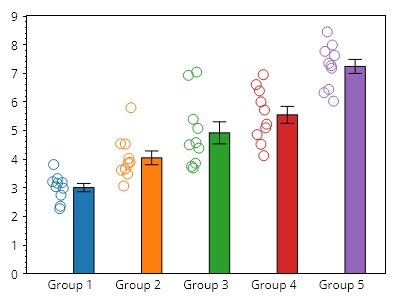
ScottPlot.Plot myPlot = new();

for (int i = 0; i < 5; i++)
{
    double[] values = Generate.RandomNormal(10, mean: 3 + i);
    myPlot.Add.Population(values, x: i);
}

// デフォルトでプロットの下端がゼロにスナップするようにする
myPlot.Axes.Margins(bottom: 0);

// デフォルトの数値目盛りをカスタムのものに置き換える
double[] tickPositions = Generate.Consecutive(5);
string[] tickLabels = Enumerable.Range(1, 5).Select(x => $"グループ {x}").ToArray();
myPlot.Axes.Bottom.SetTicks(tickPositions, tickLabels);

// プロットの外観を調整する
myPlot.Axes.Bottom.MajorTickStyle.Length = 0;
myPlot.Axes.Margins(bottom: 0);
myPlot.HideGrid();

myPlot.SavePng("demo.png", 400, 300);
このレシピは、Population プロットカテゴリに含まれる多くのレシピの 1 つです