背景ゲージの淡色表示
デフォルトでは、各ゲージの全範囲が半透明のリングとして描画されます。透明度は必要に応じて調整できます。
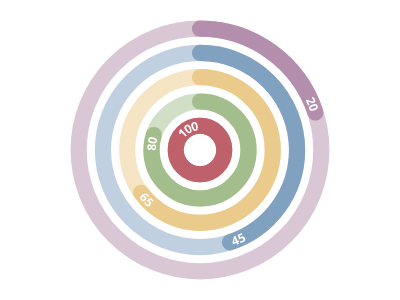
ScottPlot.Plot myPlot = new();

myPlot.Add.Palette = new ScottPlot.Palettes.Nord();
double[] values = { 100, 80, 65, 45, 20 };

var radialGaugePlot = myPlot.Add.RadialGaugePlot(values);
radialGaugePlot.BackgroundTransparencyFraction = .5;

myPlot.SavePng("demo.png", 400, 300);
このレシピは、ラジアルゲージカテゴリに含まれる多数のレシピの 1 つです