ステッププロット
散布図は、点を斜めの線ではなく直角で接続するステッププロット表示を使用して作成できます。ステップの方向はカスタマイズできます。
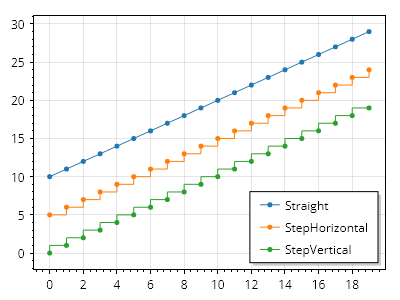
ScottPlot.Plot myPlot = new();

double[] xs = Generate.Consecutive(20);
double[] ys1 = Generate.Consecutive(20, first: 10);
double[] ys2 = Generate.Consecutive(20, first: 5);
double[] ys3 = Generate.Consecutive(20, first: 0);

var sp1 = myPlot.Add.Scatter(xs, ys1);
sp1.ConnectStyle = ConnectStyle.Straight;
sp1.LegendText = "直線";

var sp2 = myPlot.Add.Scatter(xs, ys2);
sp2.ConnectStyle = ConnectStyle.StepHorizontal;
sp2.LegendText = "水平ステップ";

var sp3 = myPlot.Add.Scatter(xs, ys3);
sp3.ConnectStyle = ConnectStyle.StepVertical;
sp3.LegendText = "垂直ステップ";

myPlot.ShowLegend();

myPlot.SavePng("demo.png", 400, 300);
このレシピは、散布図カテゴリに含まれる多数のレシピのうちの 1 つです