散布図のスタイリング
散布図は、散布図を追加した後に返されるオブジェクトを操作することで、広範囲にスタイル設定できます。散布図の Label プロパティにテキストを割り当てると、凡例に表示できるようになります。
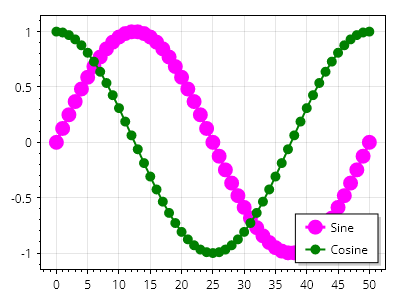
ScottPlot.Plot myPlot = new();

double[] xs = Generate.Consecutive(51);
double[] ys1 = Generate.Sin(51);
double[] ys2 = Generate.Cos(51);

var sp1 = myPlot.Add.Scatter(xs, ys1);
sp1.LegendText = "正弦";
sp1.LineWidth = 3;
sp1.Color = Colors.Magenta;
sp1.MarkerSize = 15;

var sp2 = myPlot.Add.Scatter(xs, ys2);
sp2.LegendText = "余弦";
sp2.LineWidth = 2;
sp2.Color = Colors.Green;
sp2.MarkerSize = 10;

myPlot.ShowLegend();

myPlot.SavePng("demo.png", 400, 300);
このレシピは、散布図カテゴリにある多数のレシピの 1 つです