環状楕円扇形
環状楕円扇形は、2つの楕円の間にある2D形状であり、中心点を基準とした2つの角度の間の領域のみを含むように切り出すことができます。
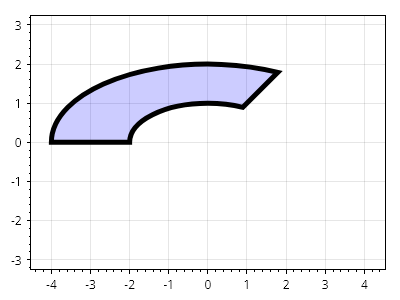
ScottPlot.Plot myPlot = new();

Coordinates center = new(0, 0);
double outerRadiusX = 4.0;
double outerRadiusY = 2.0;
double innerRadiusX = 2.0;
double innerRadiusY = 1.0;
Angle start = Angle.FromDegrees(45);
Angle sweep = Angle.FromDegrees(135);

var cs = myPlot.Add.AnnularEllipticalSector(center, outerRadiusX, outerRadiusY, innerRadiusX, innerRadiusY, start, sweep);
cs.FillColor = Colors.Blue.WithAlpha(.2);
cs.LineColor = Colors.Black;
cs.LineWidth = 5;

myPlot.Axes.SquareUnits(); // 円が引き伸ばされないように正方単位を使用する

myPlot.SavePng("demo.png", 400, 300);
このレシピは、図形カテゴリに含まれる多数のレシピの1つです