テキストオフセット
オフセットプロパティを使用すると、テキストの位置をピクセル単位で微調整できます
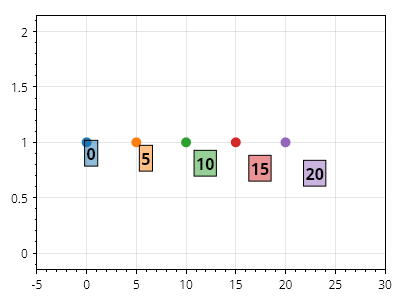
ScottPlot.Plot myPlot = new();

for (int i = 0; i < 25; i += 5)
{
    // 点にマーカーを配置する
    var marker = myPlot.Add.Marker(i, 1);

    // 点にスタイル付きテキストラベルを配置する
    var txt = myPlot.Add.Text($"{i}", i, 1);
    txt.LabelFontSize = 16;
    txt.LabelBorderColor = Colors.Black;
    txt.LabelBorderWidth = 1;
    txt.LabelPadding = 2;
    txt.LabelBold = true;
    txt.LabelBackgroundColor = marker.Color.WithAlpha(.5);

    // 指定されたピクセル数だけテキストラベルをオフセットする
    txt.OffsetX = i;
    txt.OffsetY = i;
}

myPlot.Axes.SetLimitsX(-5, 30);

myPlot.SavePng("demo.png", 400, 300);
このレシピは、テキストカテゴリにある多数のレシピのひとつです