軸線ラベル
軸線には、取り付けられている軸上に任意のテキストを表示するために使用できるラベルがあります。
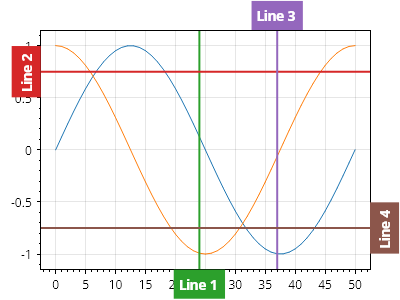
ScottPlot.Plot myPlot = new();

myPlot.Add.Signal(Generate.Sin());
myPlot.Add.Signal(Generate.Cos());

// デフォルトでは、ラベルは軸ラベルと同じ側に描画されます

var axLine1 = myPlot.Add.VerticalLine(24);
axLine1.Text = "線 1";

var axLine2 = myPlot.Add.HorizontalLine(0.75);
axLine2.Text = "線 2";

// ラベルは軸ラベルとは反対側に描画できます

var axLine3 = myPlot.Add.VerticalLine(37);
axLine3.Text = "線 3";
axLine3.LabelOppositeAxis = true;

var axLine4 = myPlot.Add.HorizontalLine(-.75);
axLine4.Text = "線 4";
axLine4.LabelOppositeAxis = true;

// 右側と上側に余分なパディングを設けることで、ラベル用のスペースを確保します
myPlot.Axes.Right.MinimumSize = 30;
myPlot.Axes.Top.MinimumSize = 30;

myPlot.SavePng("demo.png", 400, 300);
このレシピは、軸線カテゴリにある多数のレシピの 1 つです