軸線ラベルの配置
軸線ラベルには、回転や配置を含むカスタム配置を設定できます。
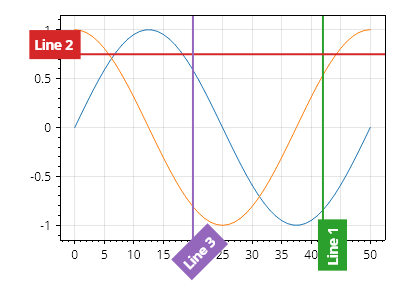
ScottPlot.Plot myPlot = new();

myPlot.Add.Signal(Generate.Sin());
myPlot.Add.Signal(Generate.Cos());

var axLine1 = myPlot.Add.VerticalLine(42);
axLine1.Text = "線 1";
axLine1.LabelRotation = -90;
axLine1.LabelAlignment = Alignment.MiddleRight;

var axLine2 = myPlot.Add.HorizontalLine(0.75);
axLine2.Text = "線 2";
axLine2.LabelRotation = 0;
axLine2.LabelAlignment = Alignment.MiddleRight;

var axLine3 = myPlot.Add.VerticalLine(20);
axLine3.Text = "線 3";
axLine3.LabelRotation = -45;
axLine3.LabelAlignment = Alignment.UpperRight;

// 回転したラベルのために下と左に余分な余白を追加する
myPlot.Axes.Bottom.MinimumSize = 60;
myPlot.Axes.Left.MinimumSize = 60;

myPlot.SavePng("demo.png", 400, 300);
このレシピは、軸線カテゴリに含まれる多数のレシピの 1 つです