カスタムテキスト付きの棒
棒の寸法に合わせて完全にカスタマイズ可能なテキストオブジェクトを棒の上に配置することで、棒ラベルを完全に制御できます。
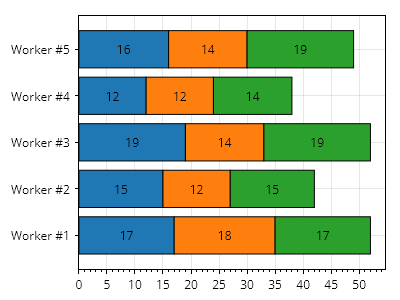
ScottPlot.Plot myPlot = new();

ScottPlot.Palettes.Category10 palette = new();

// 積み上げ棒のグループを5つ作成する
for (int i = 0; i < 5; i++)
{
    // 積み上げを伴う個別の棒を3つ作成する
    List<ScottPlot.Bar> bars = [];
    double valueBase = 0;
    for (int j = 0; j < 3; j++)
    {
        double barSize = Generate.RandomInteger(10, 20);
        ScottPlot.Bar bar1 = new()
        {
            FillColor = palette.GetColor(j),
            Position = i,
            ValueBase = valueBase,
            Value = valueBase + barSize,
            Label = $"{barSize}",
            CenterLabel = true,
        };

        bars.Add(bar1);
        valueBase += barSize;
    }

    // 積み上げ棒をプロットする
    var barPlot = myPlot.Add.Bars(bars);
    barPlot.Horizontal = true;
}

// 棒が左端から始まるようにプロットのスタイルを設定する
myPlot.Axes.Margins(left: 0);

// カスタムグループラベルを追加する
double[] tickPositions = Generate.Consecutive(5);
string[] tickLabels = Enumerable.Range(1, 5).Select(x => $"作業者 #{x}").ToArray();
myPlot.Axes.Left.SetTicks(tickPositions, tickLabels);

myPlot.SavePng("demo.png", 400, 300);
このレシピは、棒プロットカテゴリに含まれる多数のレシピの1つです