目盛り数
目標とする目盛りの数を指定でき、自動目盛りジェネレーターはその数の目盛りを配置しようとします。この方式により、画像サイズが大きくなるにつれて目盛りの密度を下げることができます。
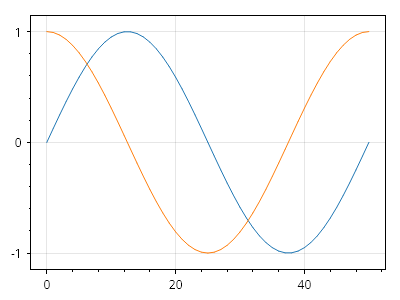
ScottPlot.Plot myPlot = new();

myPlot.Add.Signal(Generate.Sin(51));
myPlot.Add.Signal(Generate.Cos(51));

ScottPlot.TickGenerators.NumericAutomatic tickGenX = new();
tickGenX.TargetTickCount = 3;
myPlot.Axes.Bottom.TickGenerator = tickGenX;

ScottPlot.TickGenerators.NumericAutomatic tickGenY = new();
tickGenY.TargetTickCount = 3;
myPlot.Axes.Left.TickGenerator = tickGenY;

myPlot.SavePng("demo.png", 400, 300);
このレシピは、目盛りのカスタマイズカテゴリに含まれる多数のレシピの 1 つです