散布図からの FillY
FillY プロットは、同じ X 値を共有する 2 つの散布図から作成できます。
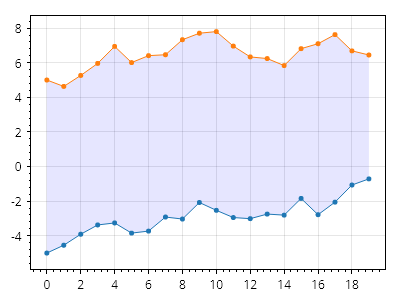
ScottPlot.Plot myPlot = new();

RandomDataGenerator dataGen = new(0);

int count = 20;
double[] xs = Generate.Consecutive(count);
double[] ys1 = dataGen.RandomWalk(count, offset: -5);
double[] ys2 = dataGen.RandomWalk(count, offset: 5);

var scatter1 = myPlot.Add.Scatter(xs, ys1);
var scatter2 = myPlot.Add.Scatter(xs, ys2);

var fill = myPlot.Add.FillY(scatter1, scatter2);
fill.FillColor = Colors.Blue.WithAlpha(.1);
fill.LineWidth = 0;

// 塗りつぶしを散布図の背後に移動する
myPlot.MoveToBack(fill);

myPlot.SavePng("demo.png", 400, 300);
このレシピは、FillY プロットカテゴリに含まれる多くのレシピの 1 つです