カスタム型での FillY
変換関数を指定すれば、任意の型のデータから FillY プロットを作成できます。
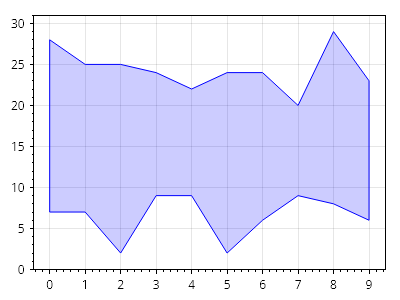
ScottPlot.Plot myPlot = new();

// 非標準のデータ型でソースデータを作成する
List<(int, int, int)> data = new();
Random rand = new(0);
for (int i = 0; i < 10; i++)
{
    int x = i;
    int y1 = rand.Next(0, 10);
    int y2 = rand.Next(20, 30);
    data.Add((x, y1, y2));
}

// ソースデータ型用のカスタムコンバーターを作成する
static (double, double, double) MyConverter((int, int, int) s) => (s.Item1, s.Item2, s.Item3);

// カスタムコンバーターを使用してソースデータから塗りつぶしプロットを作成する
var fill = myPlot.Add.FillY(data, MyConverter);
fill.FillColor = Colors.Blue.WithAlpha(.2);
fill.LineColor = Colors.Blue;

myPlot.SavePng("demo.png", 400, 300);
このレシピは、FillY プロットカテゴリに含まれる多数のレシピの 1 つです