財務チャートのダークモード
ローソク足と図の色オプションをカスタマイズすることで、ダークモードの財務プロットを実現できます。
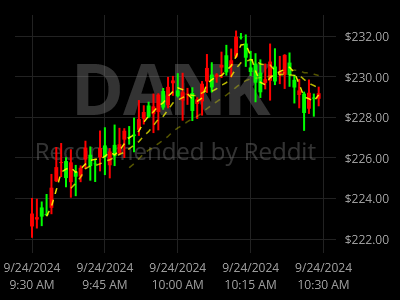
ScottPlot.Plot myPlot = new();

// サンプルの財務データを追加する
OHLC[] prices = Generate.Financial.OHLCsByMinute(60);
var candlePlot = myPlot.Add.Candlestick(prices);
candlePlot.Axes.YAxis = myPlot.Axes.Right;

// 下部に DateTime 目盛りを設定する
myPlot.Axes.DateTimeTicksBottom();

// 右側に通貨の目盛り書式を使用する
myPlot.Axes.Right.TickGenerator = new ScottPlot.TickGenerators.NumericAutomatic()
{
    LabelFormatter = (double value) => value.ToString("C")
};

// ローソク足のスタイルをカスタマイズする
candlePlot.RisingColor = ScottPlot.Color.FromHtml("#FF0000");
candlePlot.FallingColor = ScottPlot.Color.FromHtml("#00FF00");

// SMA インジケーターを追加する
int[] windowSizes = { 3, 8, 20 };
foreach (int windowSize in windowSizes)
{
    ScottPlot.Finance.SimpleMovingAverage sma = new(prices, windowSize);
    var sp = myPlot.Add.Scatter(sma.Dates, sma.Means);
    sp.Axes.YAxis = myPlot.Axes.Right;
    sp.MarkerSize = 0;
    sp.LineWidth = 1.5f;
    sp.LinePattern = LinePattern.DenselyDashed;
    sp.Color = Colors.Yellow.WithAlpha(1 - windowSize / 30.0);
}

// 銘柄情報を追加し、プロットの背面へ移動する
(var line1, var line2) = myPlot.Add.BackgroundText("DANK", "Reddit による推奨");

line1.LabelFontColor = Colors.Gray.WithAlpha(.4);
line1.LabelFontSize = 72;
line1.LabelBold = true;
line1.Axes.YAxis = myPlot.Axes.Right;

line2.LabelFontColor = Colors.Gray.WithAlpha(.4);
line2.LabelFontSize = 24;
line2.LabelBold = false;
line2.Axes.YAxis = myPlot.Axes.Right;

// その他のプロットコンポーネントの色をカスタマイズする
myPlot.FigureBackground.Color = Colors.Black;
myPlot.DataBackground.Color = Colors.Black;
myPlot.Axes.Color(ScottPlot.Color.FromHtml("#999999"));
myPlot.Axes.Right.MajorTickStyle.Color = Colors.Transparent;
myPlot.Axes.Right.MinorTickStyle.Color = Colors.Transparent;
myPlot.Axes.Bottom.MajorTickStyle.Color = Colors.Transparent;
myPlot.Axes.FrameWidth(0);
myPlot.Grid.MajorLineColor = ScottPlot.Color.FromHtml("#222222");
myPlot.Grid.YAxis = myPlot.Axes.Right;

myPlot.SavePng("demo.png", 400, 300);
このレシピは、財務プロットカテゴリにある多数のレシピの 1 つです