シェーディング付き積み上げ散布図
塗りつぶし散布図に垂直方向および水平方向のオフセットを組み合わせて、興味深い視覚効果を実現する方法を示します。
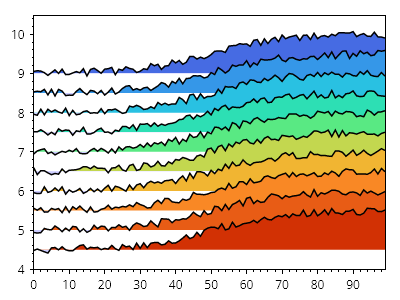
ScottPlot.Plot myPlot = new();

double[] xs = ScottPlot.Generate.Consecutive(100);
ScottPlot.Colormaps.MellowRainbow cmap = new();

for (int i = 0; i < 10; i++)
{
    double yOffset = 9 - i * 0.5;
    double[] ys = Generate.Sigmoidal(xs.Length)
        .Select(y => y + yOffset)
        .ToArray();

    Generate.AddNoiseInPlace(ys, 0.1);

    var sig = myPlot.Add.ScatterLine(xs, ys);
    sig.LineColor = Colors.Black;
    sig.LineWidth = 1.5f;
    sig.FillY = true;
    sig.FillYValue = yOffset;
    sig.FillYAboveColor = cmap.GetColor(i, 10);
}

myPlot.HideGrid();
myPlot.Axes.MarginsX(0);

myPlot.SavePng("demo.png", 400, 300);
このレシピは、散布図カテゴリに含まれる多数のレシピの 1 つです