積み上げ塗りつぶし折れ線プロット
積み上げ塗りつぶし折れ線プロットの効果は、領域を塗りつぶす ScatterLine を重ねることで実現できます。
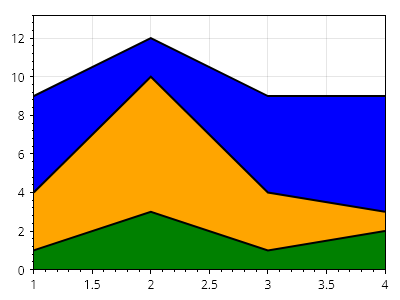
ScottPlot.Plot myPlot = new();

// サンプルデータを作成する
double[] xs = { 1, 2, 3, 4 };
double[] ys1 = { 1, 3, 1, 2 };
double[] ys2 = { 3, 7, 3, 1 };
double[] ys3 = { 5, 2, 5, 6 };

// 各プロットを、それより前のすべてのプロットの合計分だけ垂直方向にシフトする
ys2 = Enumerable.Range(0, ys2.Length).Select(x => ys2[x] + ys1[x]).ToArray();
ys3 = Enumerable.Range(0, ys2.Length).Select(x => ys3[x] + ys2[x]).ToArray();

// パディングされたデータポイントを ScatterLine としてプロットする
var sp3 = myPlot.Add.ScatterLine(xs, ys3, Colors.Black);
var sp2 = myPlot.Add.ScatterLine(xs, ys2, Colors.Black);
var sp1 = myPlot.Add.ScatterLine(xs, ys1, Colors.Black);

// プロットのスタイルを設定する
sp1.LineWidth = 2;
sp2.LineWidth = 2;
sp3.LineWidth = 2;
sp1.FillY = true;
sp2.FillY = true;
sp3.FillY = true;
sp1.FillYColor = Colors.Green;
sp2.FillYColor = Colors.Orange;
sp3.FillYColor = Colors.Blue;

// データがプロットの端まで届くように狭い余白を使用する
myPlot.Axes.Margins(0, 0, 0, 0.1);

myPlot.SavePng("demo.png", 400, 300);
このレシピは、散布図カテゴリに含まれる多数のレシピの 1 つです