カラーマップ
カラーマップは、複数の色からなる連続的なグラデーションです。ヒートマップや画像のような連続データに色を付けるために使用できますが、カラーマップを直接サンプリングして色のコレクションを作成することもできます。https://scottplot.net/cookbook/5/colormaps/ には、ScottPlot に含まれるすべてのカラーマップが表示されています。
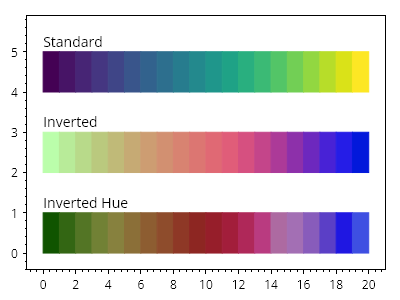
ScottPlot.Plot myPlot = new();

var colormap1 = new ScottPlot.Colormaps.Viridis();
var colormap2 = colormap1.Invert();
var colormap3 = colormap1.InvertHue();

int steps = 20;
for (int x = 0; x < steps; x++)
{
    CoordinateRect rect1 = CoordinateRect.UnitSquare.WithTranslation(x, 4);
    CoordinateRect rect2 = CoordinateRect.UnitSquare.WithTranslation(x, 2);
    CoordinateRect rect3 = CoordinateRect.UnitSquare.WithTranslation(x, 0);
    var shape1 = myPlot.Add.Rectangle(rect1);
    var shape2 = myPlot.Add.Rectangle(rect2);
    var shape3 = myPlot.Add.Rectangle(rect3);

    // カラーマップを使用して色を設定する
    double fraction = (double)x / (steps - 1);
    shape1.FillColor = colormap1.GetColor(fraction);
    shape2.FillColor = colormap2.GetColor(fraction);
    shape3.FillColor = colormap3.GetColor(fraction);

    shape1.LineColor = shape1.FillColor;
    shape2.LineColor = shape2.FillColor;
    shape3.LineColor = shape3.FillColor;
}

myPlot.Add.Text("標準", 0, 5.5);
myPlot.Add.Text("反転", 0, 3.5);
myPlot.Add.Text("色相反転", 0, 1.5);
myPlot.HideGrid();

myPlot.SavePng("demo.png", 400, 300);
このレシピは、プロットのスタイリングカテゴリに含まれる多数のレシピの 1 つです