反転パレット
パレットは反転できます。明るい背景でうまく機能するパレットは、反転すれば通常、暗い背景でもうまく機能します。
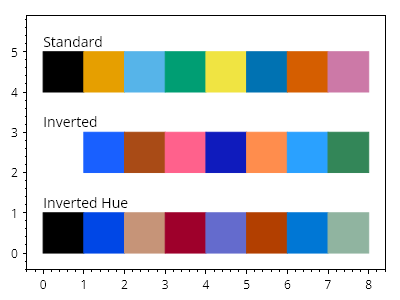
ScottPlot.Plot myPlot = new();

var palette1 = new ScottPlot.Palettes.ColorblindFriendly();
var palette2 = palette1.Inverted();
var palette3 = palette1.InvertedHue();

for (int x = 0; x < palette1.Count(); x++)
{
    CoordinateRect rect1 = CoordinateRect.UnitSquare.WithTranslation(x, 4);
    CoordinateRect rect2 = CoordinateRect.UnitSquare.WithTranslation(x, 2);
    CoordinateRect rect3 = CoordinateRect.UnitSquare.WithTranslation(x, 0);
    var shape1 = myPlot.Add.Rectangle(rect1);
    var shape2 = myPlot.Add.Rectangle(rect2);
    var shape3 = myPlot.Add.Rectangle(rect3);

    // パレットを使用して色を設定する
    shape1.FillColor = palette1.Colors[x];
    shape2.FillColor = palette2.Colors[x];
    shape3.FillColor = palette3.Colors[x];

    shape1.LineColor = shape1.FillColor;
    shape2.LineColor = shape2.FillColor;
    shape3.LineColor = shape3.FillColor;

}

myPlot.Add.Text("標準", 0, 5.5);
myPlot.Add.Text("反転", 0, 3.5);
myPlot.Add.Text("色相反転", 0, 1.5);
myPlot.HideGrid();

myPlot.SavePng("demo.png", 400, 300);
このレシピは、プロットのスタイリングカテゴリにある多数のレシピの1つです