フォントの太さを設定
フォントの太さはカスタマイズできます。
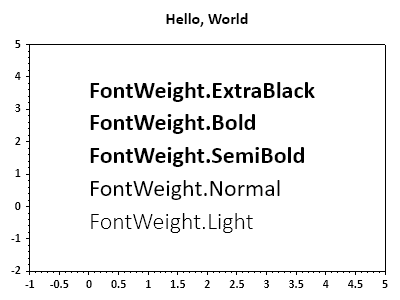
ScottPlot.Plot myPlot = new();

myPlot.Font.Set("Calibri"); // 既存の多数のプロットラベルに適用
myPlot.Title("Hello, World");

FontWeight[] weights = [FontWeight.Light, FontWeight.Normal,
    FontWeight.SemiBold, FontWeight.Bold, FontWeight.ExtraBlack];

for (int i = 0; i < weights.Length; i++)
{
    FontWeight weight = weights[i];
    myPlot.Font.Set("Calibri", weight: weight); // 新しいラベルに適用
    var text = myPlot.Add.Text($"FontWeight.{weight}", 0, i);
    text.LabelFontSize = 24;
}

myPlot.Axes.SetLimits(-1, 5, -2, weights.Length);
myPlot.HideGrid();

myPlot.SavePng("demo.png", 400, 300);
このレシピは、プロットのスタイリングカテゴリに含まれる多数のレシピの1つです