フォントの傾きの設定
フォントの傾きはカスタマイズできます。
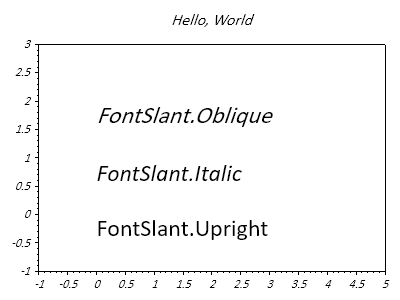
ScottPlot.Plot myPlot = new();

myPlot.Font.Set("Calibri", slant: FontSlant.Italic); // 既存の多くのプロットラベルに適用する
myPlot.Title("Hello, World");

FontSlant[] slants = [FontSlant.Upright, FontSlant.Italic, FontSlant.Oblique];

for (int i = 0; i < slants.Length; i++)
{
    FontSlant slant = slants[i];
    myPlot.Font.Set("Calibri", slant: slant); // 新しいラベルに適用する
    var text = myPlot.Add.Text($"FontSlant.{slant}", 0, i);
    text.LabelFontSize = 24;
}

myPlot.Axes.SetLimits(-1, 5, -1, slants.Length);
myPlot.HideGrid();

myPlot.SavePng("demo.png", 400, 300);
このレシピは、プロットのスタイリングカテゴリに含まれる多数のレシピのひとつです